How to Measure Call Latency and Fix it?

You ask a question in a meeting. An awkward silence follows. You start to repeat yourself. Your colleague begins to answer. Now you are both talking at once. This frustrating experience is a common symptom of a digital problem.
The issue is known as call latency. It disrupts the natural flow of conversation. It makes clear communication difficult.
This guide offers a complete solution. You will learn what call latency truly is. You will discover how to measure it with simple tools. Most importantly, you will get an actionable plan to fix it. Your business communications depend on clarity, especially with remote work communication. Let’s eliminate the delay for good.
Before diving into technical fixes, you must correctly diagnose the problem. Latency creates very specific and recognizable issues during a phone call. If you experience these symptoms, your network likely suffers from high latency. Review these common signs to see if they match your experience.
The delay is significant. You cannot tell when the other person has finished speaking. This causes both parties to start talking at the same time. The conversation becomes a series of interruptions.
You speak a sentence. You then hear your own voice repeated back to you a moment later. This echo is a direct result of data taking too long to travel.
Human conversation has a natural rhythm. High latency breaks this rhythm. The long gaps between a statement and a response make discussions feel stilted and awkward.
You tell a joke. You have to wait two or three seconds for the laugh. This audio lag removes the immediacy from your interactions. It can make your team feel disconnected.
The delays are so long that you are not sure the call is still active. You find yourself asking, “Are you still there?”. This is a clear indicator that latency is disrupting your VoIP call quality.
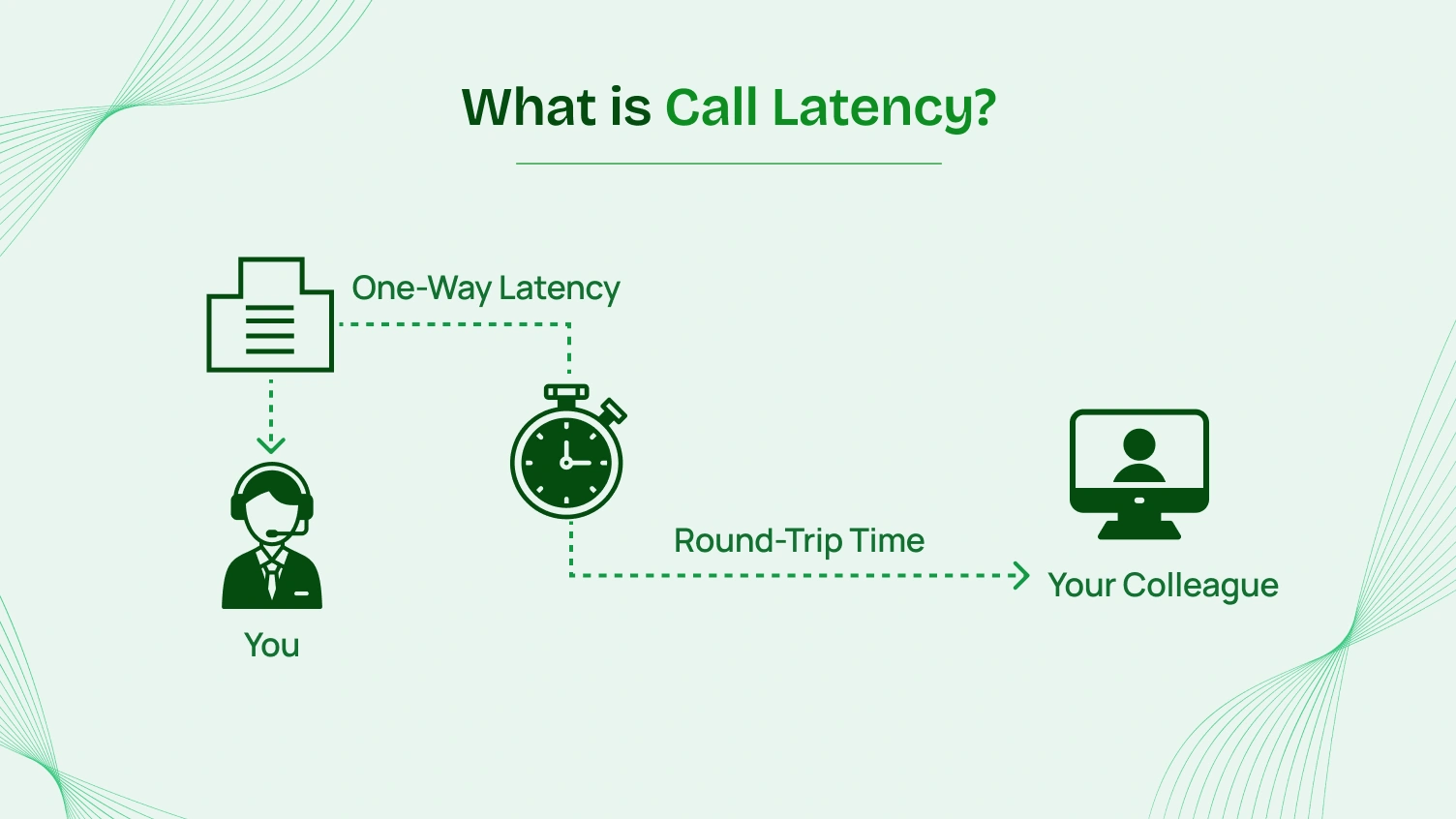
Imagine sending a letter across the country. You must wait for it to arrive. You must then wait for the recipient to send a reply back to you. Call latency is similar to the total round-trip time of your voice reaching the other party.
Technically, latency is the time it takes for a single data packet to travel across a network. This time is measured in milliseconds (ms). For a voice conversation to feel natural, this delay must be extremely short.
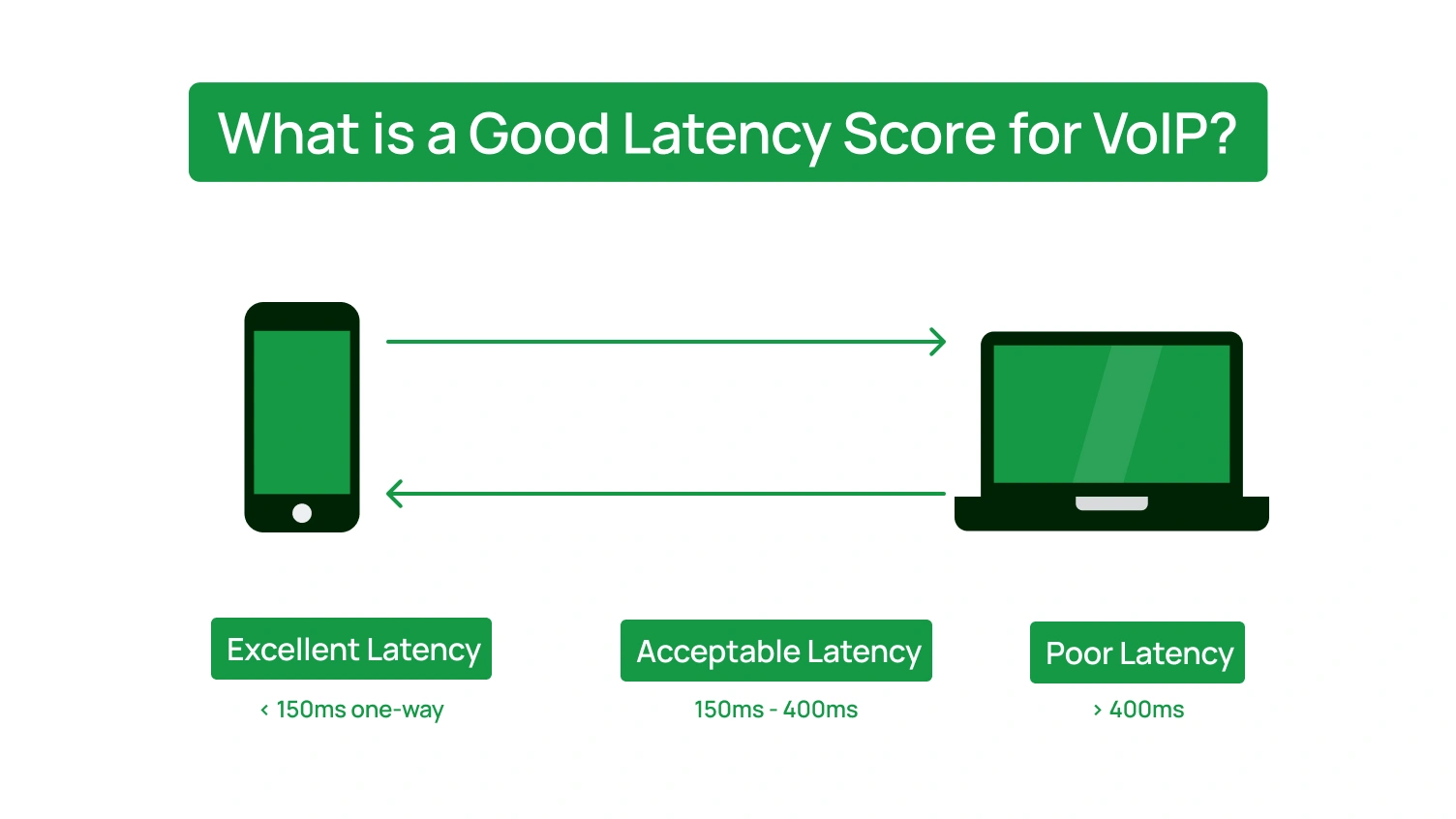
The International Telecommunication Union (ITU) sets a clear standard. Its ITU-T G.114 recommendation states that a one-way latency below 150 ms is ideal for high-quality voice calls with echo adequately controlled. Anything significantly higher creates noticeable issues.
According to Business Research Company, the global VoIP market is projected to grow to $270.05 billion by 2029, and the reliance on this technology is only increasing. Therefore, understanding its core challenges is crucial.
Latency rarely works alone; it is often accompanied by two other network problems: jitter and packet loss. Together, these three issues are the primary cause of poor call quality. We will explore their differences next.
To effectively fix call latency, you must distinguish it from its close relatives. Jitter and packet loss also degrade call quality. Each problem has a unique cause and a different solution. Pinpointing the correct issue is a critical step to troubleshoot VoIP issues effectively.
| Metric | The Core Problem | Description | How It Sounds |
|---|---|---|---|
| Latency | The Delay | Data packets are slow to arrive, but they arrive in the correct order. | Predictable, awkward pauses. An unnatural conversational rhythm. |
| Jitter | The Inconsistent Delay | Data packets arrive with irregular timing and out of order. | Robotic, choppy, or garbled audio as your phone struggles to reassemble the data. |
| VoIP Packet Loss | The Missing Data | Some data packets never arrive at their destination at all. | Words or syllables are completely missing. The audio cuts in and out. |
While these three issues all harm your business communications, they are not interchangeable. A consistent audio delay points to different root causes than robotic-sounding audio. By correctly identifying the symptom you are experiencing, you can more effectively diagnose the underlying problem. This distinction is the key to applying the right fix instead of guessing.
High call latency is not random. Specific bottlenecks in the path cause your voice data to travel. Identifying the right cause is essential for finding the right fix.
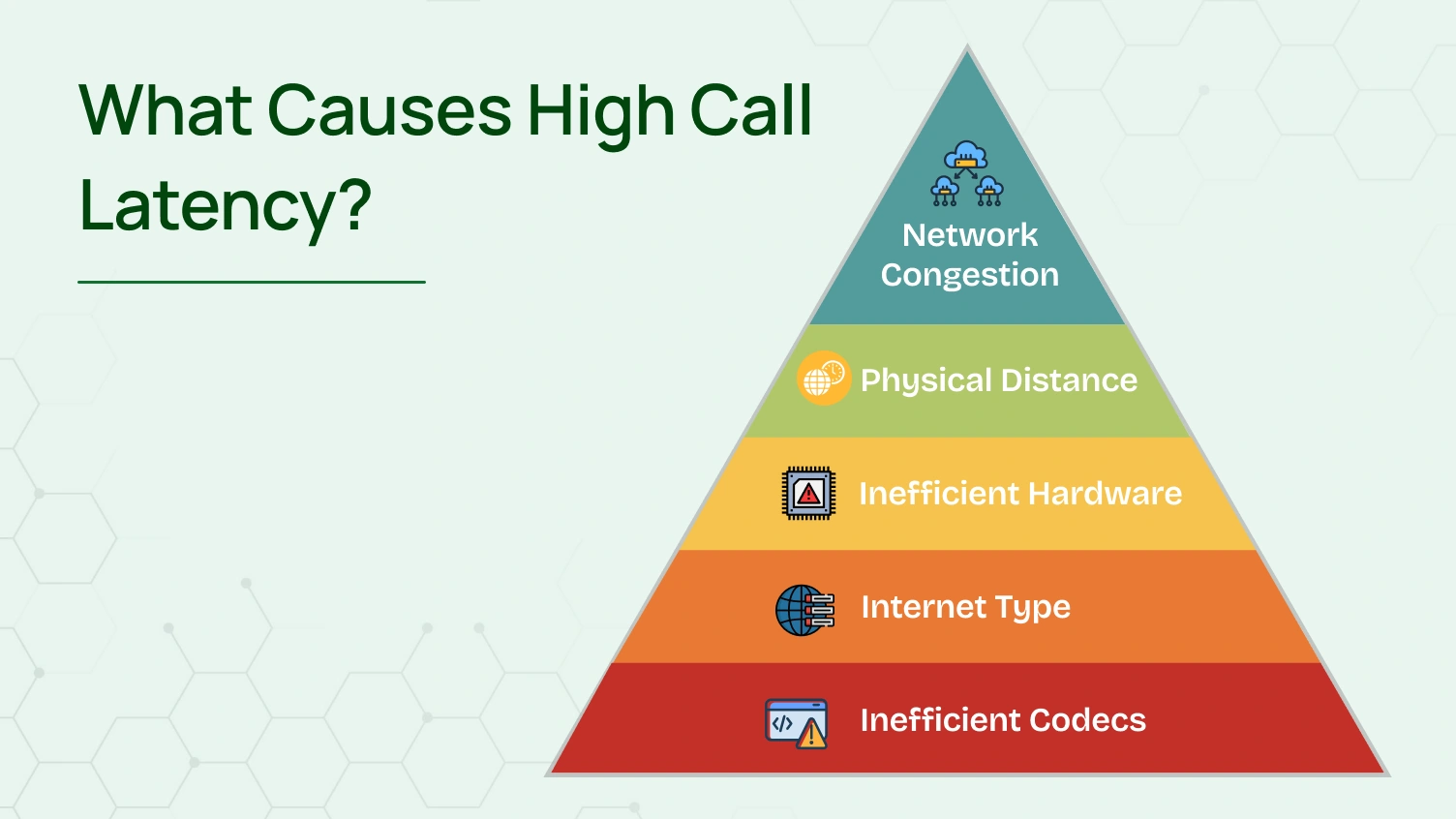
The internet is your highway. The moment you are connecting too many devices on the highway at the same time, you are experiencing a traffic jam. This is network congestion.
These activities consume high bandwidths: video streaming, gaming, and downloading huge files. There is not much room for your voice data. This puts your VoIP communications in the queue, and that delays them.
The data does not actually move from point A to point B. It does, however, take time to travel. Data travels extremely fast, but distance adds up. A call from London to New York will, of course, have greater latency than a call within the same city. The data simply has more distance to travel down the fiber optic cable. This latency is physical and cannot be removed.
Your network hardware is responsible for holding your data. An old or low-quality router is a huge bottleneck. It does not filter and process traffic as well. That introduces latency problems. The same goes with an old computer or VoIP phone; it is not always going to have the processing capabilities to process the call so smoothly.
How you engage with your network is important.
Wi-Fi: Wireless connections are easy. They are also prone to interference because of other things, because of walls, and even because of microwave ovens. Interference makes the setup less powerful and introduces latency.
Ethernet: A wired Ethernet is a physical, straight-line connection to the router. It is consistently more reliable for voice communications than Wi-Fi.
A codec is software that compresses and decompresses your voice data. This process makes the data small enough to send over the internet. Some codecs are more efficient than others. An older or poorly chosen codec can add extra processing time at both ends of the call. This added time contributes to the overall call latency.
You now know the symptoms and the causes. It is time to move from theory to practice. You must measure call latency to confirm the problem and to see if your fixes work. You do not need expensive software for this. The following three methods use free, accessible testing tools to give you accurate data.
The ping test is a fundamental network diagnostic tool. It sends a small data packet to a server and measures how long it takes to get a response. This round-trip time is your latency. It is a quick way to check the health of your connection.
For Windows Users:
For Mac Users:
A standard speed test measures download and upload speeds. This is only part of the story. For VoIP, you need a test that specifically measures connection quality metrics. These tests provide a more complete picture of your network’s performance for real-time communication.
A highly recommended tool is the Cloudflare Speed Test. It is free and measures more than just speed.
This test is excellent because it separates latency from jitter. This allows you to diagnose your specific audio delay problem more accurately. A high latency number with low jitter points to a different root cause than low latency with high jitter.
Many VoIP phone systems and softphone applications have built-in tools for monitoring call quality. This is an expert tip that provides the most relevant data. The diagnostics are measured during an actual call on your VoIP provider’s network.
Look for a “Call Statistics,” “Diagnostics,” or “Call Quality” option in your phone’s menu or your softphone application’s settings during a live call. This panel often displays live latency, jitter, and packet loss metrics. Checking these stats can tell you if the problem is with your general internet connection or is specific to your VoIP service.
Once you have your measurements, you need context. What do these numbers mean for your business communications? The industry uses a metric called the Mean Opinion Score (MOS) to relate technical data to human experience. These latency benchmarks are widely accepted for ensuring high-quality voice.
Measuring latency is the diagnostic step. Now it is time for the cure. The following list of potential fixes is organized into a prioritized action plan to help you resolve your connectivity issues. Start with the easiest, most impactful fixes first.
Then, move to more advanced optimizations if the problem persists. This structured approach helps you reduce audio delay and restore clarity to your calls.
These are low-effort, high-impact changes. They address the most common causes of latency. You should try these simple steps before attempting anything more complex. They often provide an immediate improvement to your calls.
This is the single most effective quick fix. Wi-Fi is vulnerable to interference. A wired Ethernet cable provides a stable, dedicated path for your data. Plug your computer or VoIP phone directly into your router. This one change can solve many latency issues.
Your internet bandwidth is a shared resource. Applications such as streaming video, downloading large files, or syncing to the cloud consume a large portion of it. Close these programs before making important calls. Freeing up this bandwidth gives your voice data the room it needs.
It is an old but tried solution. You will clear out the temporary memory or the network hardware’s cache, thus removing temporary issues and processing errors that could be the cause of lag. Turn both devices off, then wait for 30 seconds before turning them back on.
If the quick wins are insufficient, you will have to modify your network’s settings. These modifications necessitate you logging into your router’s admin page. They provide you with more direct control over the manner in which your network deals with traffic.
Quality of Service, or QoS, is a major feature for any business that uses VoIP. It is a VIP lane on the internet expressway reserved solely for your voice traffic. If QoS is enabled, your router will put VoIP call traffic ahead of less time-sensitive kinds of data, like mail or web browsing.
This will ensure that your calls receive the correct amount of bandwidth, even when the network is congested. You will find this setting in your router’s administrator page, usually in the “Advanced Settings” or “QoS” section.
If your network has low jitter but high latency, a smaller jitter buffer might improve your call experience. Check your phone’s or softphone’s advanced settings for this option.
Sometimes, the problem is bigger than a simple setting. If you have tried all the above fixes and still have high latency, you may need to consider more fundamental changes. These solutions are strategic investments in your communications infrastructure.
The old router may become the weak point in your network. Business routers or gaming routers tend to have more powerful processors. They can handle traffic more effectively and can also greatly decrease call latency.
Your internet connection is based on your ISP. In case your ping tests are always high even during off-peak hours, then the issue might be with the network of your provider. You can test at different times of the day. When the latency is consistently high, then it is time to do some research on other ISPs in your locality.
The most important long-term solution is your choice of VoIP phone system. A top-tier provider invests heavily in its network infrastructure. They ensure your calls travel the most efficient, lowest-latency path possible.
You have optimized your local network. You have upgraded your hardware. If latency persists, the final variable is your provider. The infrastructure of your VoIP provider is the single biggest factor in call quality, and its impact is significant.
According to Zoom, teams are 62% more productive with effective VoIP systems, and businesses can save 30% to 50% after switching. A superior provider builds its network specifically to help you achieve these results by minimizing delay and delivering clear audio.
Look for a provider that has a strong focus on network architecture. Geographically dispersed points of presence, or PoPs, are also a key feature. These PoPs route your voice traffic the shortest distance needed. A provider that also has a good, private set of networks can route your calls better by sending them through a well-tuned call flow, avoiding the inconsistency of the public internet.
Selecting the appropriate provider is not a temporary solution, but the long-term solution to guarantee that all your business communication tools are built on a foundation of quality. This includes not only clear calls but also powerful features like seamless CRM integration.
Call latency is a solvable problem. It does not have to be a permanent source of frustration. This guide has given you a complete roadmap. You can now identify the symptoms of audio delay with confidence. You are equipped with practical, tool-agnostic methods to measure call latency accurately.
Most importantly, you have a prioritized action plan. You can implement quick fixes for immediate relief. You can configure advanced settings for lasting optimization. You know how to make strategic decisions about your hardware and providers. Clear, delay-free communication is a necessity in the modern workplace.
By following these steps, you can take control of your call quality. You can move from conversational lag to true conversational lucidity.
Discover how Dialaxy’s low-latency network is engineered to deliver crystal-clear calls from day one.
Yes, a VPN can increase call latency. It adds an extra step to your data’s journey by routing traffic through an external server. While necessary for security, this extra distance and processing can add a noticeable audio delay to your VoIP calls.
This is usually due to network congestion. During peak hours (typically evenings), more people in your area are using the internet. This creates a digital “traffic jam” on your ISP’s network, causing latency issues for everyone.
The two terms are closely related but different. A ping test is a command or tool used to perform a measurement. Latency is the result of that measurement, expressed in milliseconds (ms). You use ping to measure latency.
International calls will always have higher latency than local calls due to physical distance. However, a high-quality VoIP provider with a global network can significantly reduce call latency by routing traffic through the most efficient paths possible.
A jitter buffer collects and reorders voice packets to fix choppy, robotic audio (jitter). It helps improve call quality, but it does so by adding a small, intentional delay. A poorly configured or overly large jitter buffer can actually make VoIP latency worse.
For optimal call quality, you should aim for a one-way latency below 150 milliseconds (ms). The metrics are:
< 150ms: Excellent
150ms – 400ms: Acceptable
> 400ms: Poor
